
Route Cal.com Booking Events to Gmail, Telegram & Google Sheets
About This Workflow
Most consultants running high-ticket calls find out about a cancellation or a sketchy last-minute reschedule through Cal.com's email — a generic notification with no context and no action attached. By then the slot is already burned, there's no record, no follow-up trigger, and no way to decide quickly whether the lead is worth recovering.
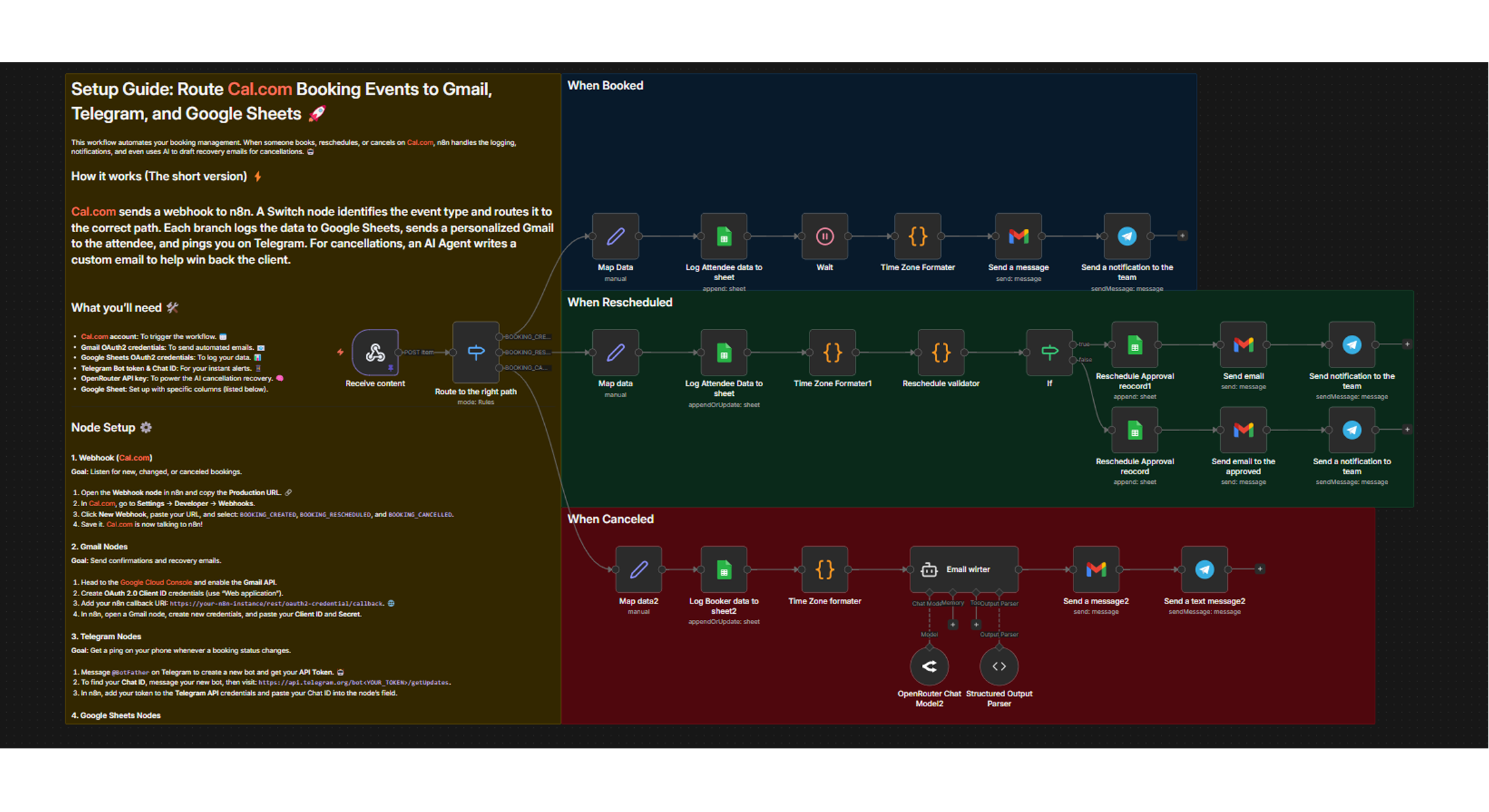
This workflow catches every Cal.com booking event — created, rescheduled, or canceled — routes it through the right logic, and fires the right response automatically.
What it does: A single webhook receives all three Cal.com trigger events. A Switch node routes each event to its own branch. On booking created: the attendee data is logged to Google Sheets, a 30-minute wait fires, then a confirmation email with meeting details goes to the attendee and an alert lands in your Telegram. On reschedule: the gap between original and new start time is calculated — if under 24 hours, the reschedule is flagged NOT APPROVED and a friction email goes to the attendee; if 24+ hours, it's approved, logged, and a softer email goes out. On cancellation: attendee data is logged, an AI agent (Claude 3.5 Sonnet via OpenRouter) writes a personalized recovery email using the attendee's stated goals and cancellation reason, and a Telegram alert asks you to decide the next step.
Who is it for: Solo consultants and small agencies running high-ticket calls through Cal.com who want automated follow-up, reschedule filtering, and cancellation recovery without touching their inbox.
APIs used: Cal.com webhooks for the lifecycle events, Gmail (OAuth2) to send confirmation and recovery emails, Telegram Bot API for real-time alerts, Google Sheets for logging all booking events, and OpenRouter (Claude 3.5 Sonnet) for generating personalized cancellation recovery emails.
Estimated cost per run: Gmail, Telegram, and Google Sheets have no per-call costs at normal volumes. Cost per run varies only for the cancellation branch — check OpenRouter pricing (currently ~$3/M input, $15/M output tokens for claude-3.5-sonnet).
- Cal.com
- Gmail
- Telegram
- Google Sheets
- OpenAI / OpenRouter
Frequently
Asked
Questions
Everything you need to know before getting started.
Yes. The workflow connects to Cal.com via webhooks, which are available on all plans including the free tier. You simply configure the webhook in your Cal.com event settings to point at the n8n webhook URL, and all three events (created, rescheduled, canceled) will be captured automatically.
Any reschedule where the new start time is less than 24 hours from the original start time is automatically flagged as NOT APPROVED. The workflow calculates this gap precisely using the timestamps from the Cal.com webhook payload. You can adjust this threshold by editing the If node in the reschedule branch.
Yes, fully. The recovery email is generated by the AI Agent node (Claude 3.5 Sonnet via OpenRouter). You can update the system prompt inside that node to change the tone, length, call-to-action, or any specific instructions. The model uses the attendee's stated goals and cancellation reason from the webhook payload as context.
OpenRouter is used by default because it provides access to Claude 3.5 Sonnet at a competitive rate. You can swap this for the OpenAI API (GPT-4o or another model) by changing the AI Agent node's credentials and model ID. The prompt structure remains the same regardless of which provider you use.
The workflow logs attendee name, email, event title, start time, end time, booking UID (iCalUID), the trigger event type (created/rescheduled/canceled), and a reschedule approval status where applicable. You'll need to create the Google Sheet manually first and set up the column headers to match before activating the workflow.
For busy business owners
Want custom automations built for your business?
These free workflows are only a fraction of what we build for clients. Let's talk about what we can automate for you.
Book a Free Call