
AI Email Dispatcher: Classify, Process, and Route Emails with Multiple Agents
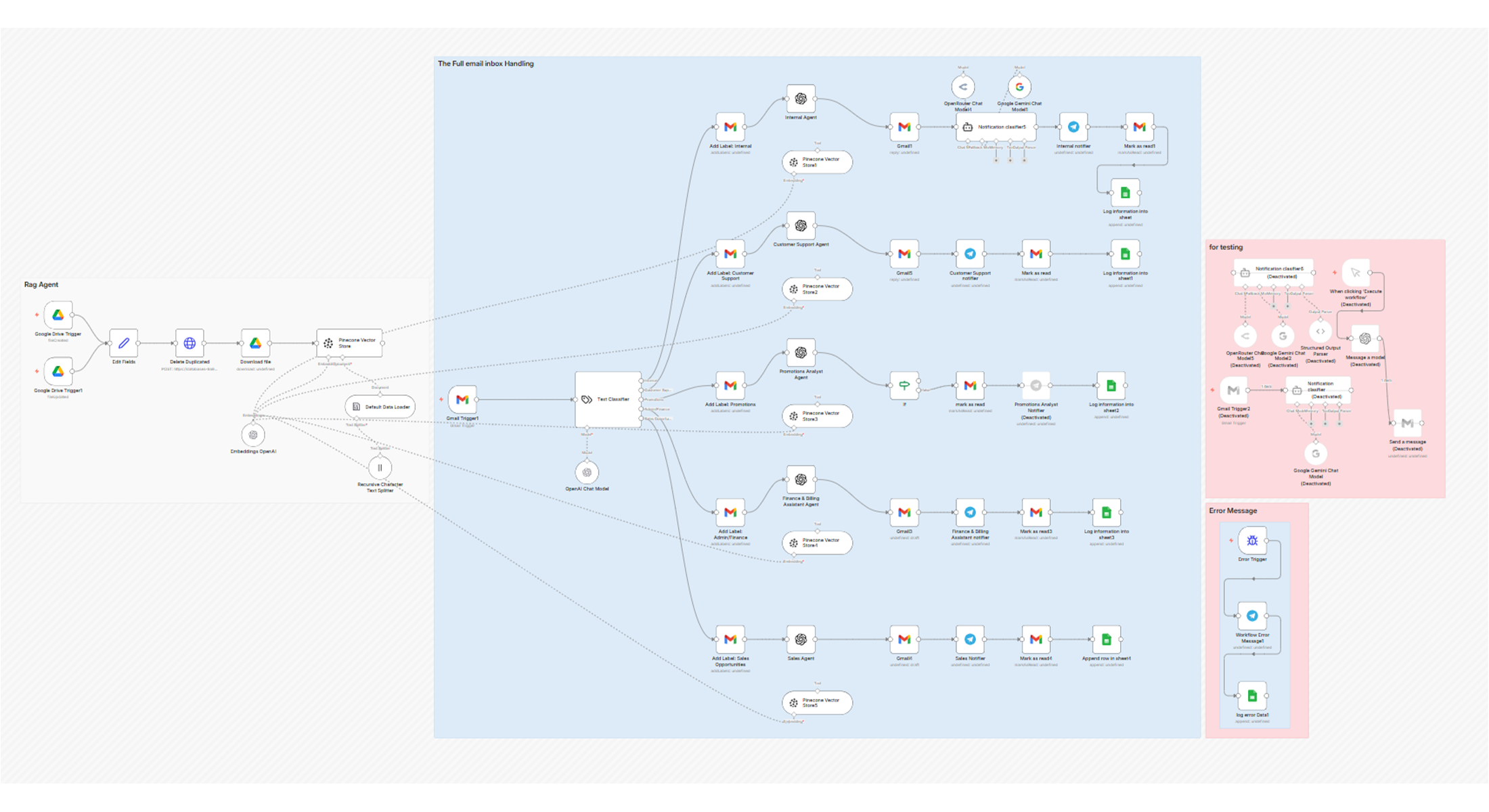
About This Workflow
This n8n template automatically classifies incoming emails (Sales, Support, Internal, Finance, Promotions) and routes them to a dedicated OpenAI LLM Agent for processing. Depending on the category, the agent will draft a reply and send it for internal or customer support emails, or generate a summary, notification, or draft reply for a human to review for Sales, Finance, and Promotions emails.
This is the ultimate workflow for managing a high volume of emails, ensuring every message gets a fast, appropriate, and structured AI-powered response or initial analysis.
How it works: The Gmail Trigger node monitors your inbox for unread emails. The Text Classifier node uses AI to read the email body and subject to categorise it as Internal, Customer Support, Sales, Promotions, or Admin/Finance. The workflow then uses a Split In Batches node and multiple If nodes to send the email data to a specific, specialised OpenAI Agent based on the classification. Each AI Agent has a custom system prompt to ensure it processes the email with the right rules, tone, and output format. Finally, the workflow either automatically replies via Gmail (for Internal and Support) or creates a draft/summary and sends a notification (for Sales, Finance, and Promotions) for human review.
Set up takes about 10–15 minutes: You will need two Gmail credentials (one for the trigger, one for actions), an OpenAI API Key connected to the five LLM Agent nodes, and Telegram or Slack credentials for sales and finance notifications. You should also create the required Gmail labels (Internal, Customer Support, Promotions, Admin/Finance, Sales Opportunity) before activating the workflow.
Easily customisable: Add or remove email categories by modifying the Text Classifier node and adding matching LLM Agents. Swap OpenAI for Gemini or Anthropic Claude. Extend actions by creating tasks in ClickUp, leads in Salesforce, or entries in a Google Sheet when a Sales Opportunity email is detected.
- Gmail Account
- OpenAI Account
- Telegram or Slack
- n8n instance
Frequently
Asked
Questions
Everything you need to know before getting started.
You need an OpenAI account with API access, which requires a usage-based paid plan. The free tier does not include API access. Costs are typically very low — a few cents per batch of emails — and you can set a monthly spending cap directly in your OpenAI dashboard to stay in control.
Yes. OpenAI's models are multilingual and can classify, summarise, and draft replies in most major languages. However, you may need to update the system prompts inside the LLM Agent nodes to instruct the AI to respond in the correct language, especially for customer-facing replies.
The Text Classifier node will assign the email to the closest matching category based on its content. If you receive a lot of emails that don't fit any category well, you can add a catch-all "Other" category in the classifier and route those to a simple notification or a human review queue.
Absolutely. Simply open the Text Classifier node and add your new category (e.g. "Job Applications" or "Partnership Requests"). Then add a matching LLM Agent node with a custom system prompt and connect it to the routing logic. The workflow is designed to be extended without rebuilding from scratch.
It depends on the category. Internal and Customer Support emails are replied to automatically by the AI agent. Sales, Finance, and Promotions emails are handled more carefully — the AI generates a draft or summary and sends you a Telegram/Slack notification so you can review and approve before anything is sent externally.
For busy business owners
Want custom automations built for your business?
These free workflows are only a fraction of what we build for clients. Let's talk about what we can automate for you.
Book a Free Call